PORTCALL OPS AGENT · FREE FOR DRY BULK OPERATIONS TEAMS
Every voyage email, read against the charter party.
Portcall Ops Agent sits beside your inbox in Outlook. It knows the voyage behind every email and the charter parties behind the voyage. It flags what doesn't match, and it drafts your reply in your team's own words.
Onboarding 5 dry bulk operating companies in November 2026 · No card, no contract
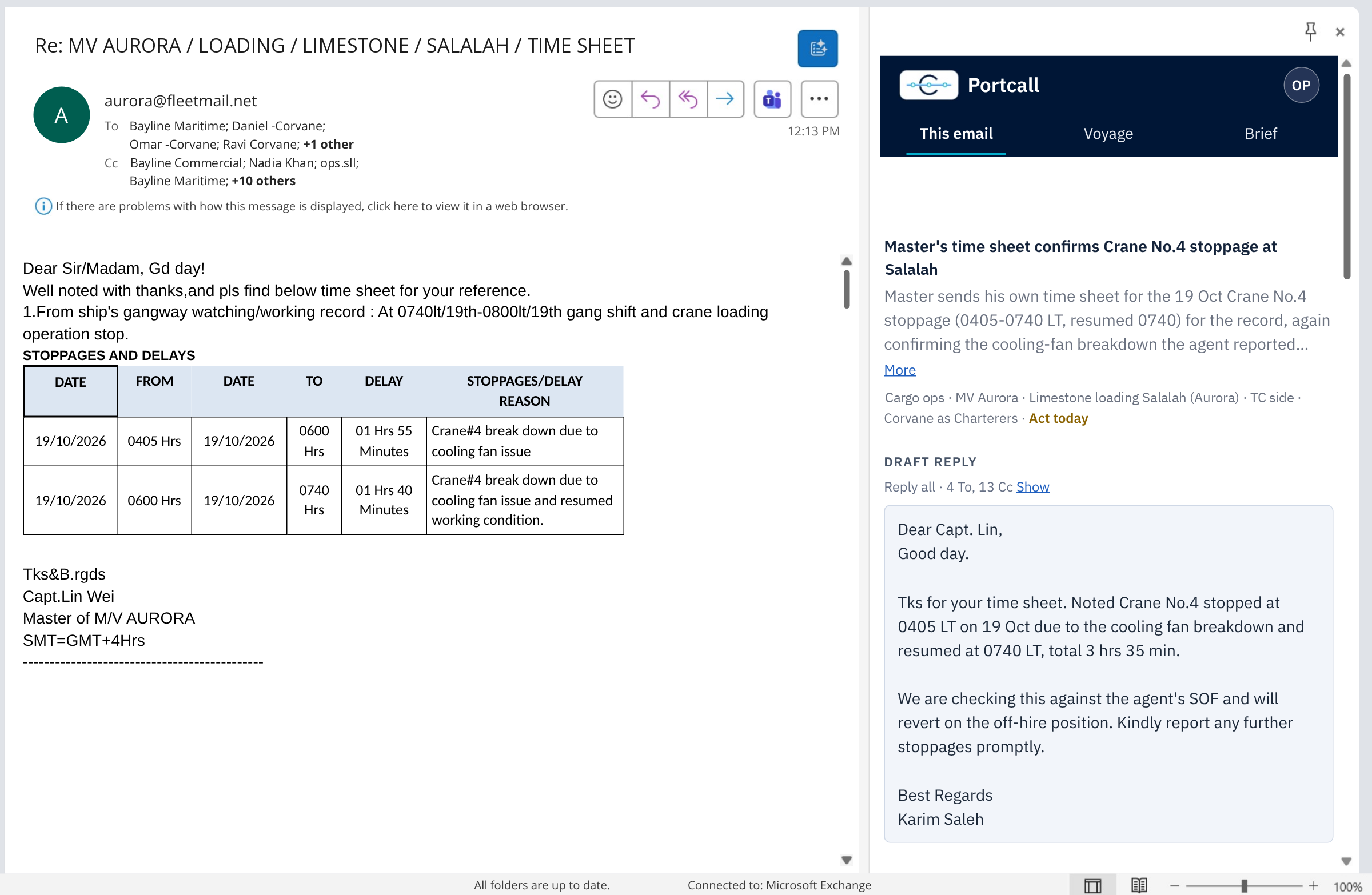
PORTCALL OPS AGENT PANEL BESIDE A LIVE VOYAGE EMAIL IN OUTLOOK
One email, start to finish
12:13. The master's time sheet arrives.
Crane No.4 broke down at Salalah. Two stoppages on the 19th, 0405 to 0600 and 0600 to 0740. Four people in To, thirteen in Cc.
Answering it properly means opening the fixture, finding the breakdown clause in the voyage charter party, checking the off-hire clause in the time charter, pulling up the agent's report from yesterday, adding up the hours and deciding who goes on the reply.
The Ops Agent does that work in the pane beside the email.
What it needs from you
Approval needed, act today. You see the status before you read a line.
What it means
One line on what the email says, linked to what came before. Here, the master is confirming the breakdown the agent already reported.
Which voyage, which contract
MV Aurora, limestone loading at Salalah, TC side, Corvane as charterers. The agent knows which charter party this email touches.
The reply, written
Reply-all to the right 17 people. Times read from the master's table, total worked out at 3 hrs 35 min, and the next step tied to the off-hire position.
What it does on every email
It knows the voyage. It checks the CP. It writes the reply.
Every voyage carries its context.
Each email is matched to its voyage, with the fixture and the voyage charter party behind it. If you're the operator, the agent also carries the time charter with your head owners, so it knows which side of the business an email touches.
Discrepancies against the CP, flagged.
When an email says something your charter party doesn't allow or doesn't cover, the agent flags it on that email, on the day, while it's still cheap to fix.
Example · Crane No.4 · 19 Oct
Stopped 0405 to 0740 LT · 3 hrs 35 min
- Voyage CP · ship's gear breakdown: check whether the time counts as laytime
- TC · time lost may put the vessel off-hire
Your reply, drafted in your words.
When we set it up, the agent learns how your ops team writes: the greetings, the shorthand, the way you put a position to a master or a charterer. Every draft comes out that way, to the right people, with the facts from the thread and the charter party position behind it. Read it, change what you like, and send it from Outlook.
Draft · Reply all · 4 To, 13 Cc
Tks for your time sheet. Noted Crane No.4 stopped at 0405 LT on 19 Oct and resumed at 0740 LT, total 3 hrs 35 min. We are checking this against the agent's SOF and will revert on the off-hire position.
Where it lives
Inside Outlook. Nothing new to learn.
The Ops Agent opens next to the email you're reading. Your team keeps working the way it does today, with the voyage and both charter parties one glance away.
Installed once through your Microsoft 365 admin, for the whole operations team.
Switch from this email to the whole voyage in one click.
Works next to everything your team already uses. Nothing to migrate.
Your data
Your email stays yours.
Never shared
Nothing you receive is shown to counterparties or to anyone outside your company.
You decide what goes out
The agent drafts. Every reply is sent by you.
Terms before setup
One page on what we access, where it's stored and how to switch it off, agreed before you install.
Why it's free
Free, because we want it on every ops desk.
Portcall is building one trusted record for every voyage. The Ops Agent is the easiest way for an operations team to start, so we're giving it away.
Portcall earns from voyage reviews and live voyage records, which some teams add later. The Ops Agent stays free either way.
Founding batch open
5
dry bulk operating companies · onboarding in November 2026
We set up every team ourselves, so we onboard in batches. Founding companies get a direct line to the people building the agent, and what they ask for gets built first.
- Your whole operations team included
- Your charter parties loaded for you
- No card, no contract
Getting started
Three steps to your first email.
Tell us who you are
Name, work email, company. One minute.
Talk to us for 20 minutes
We show the agent on one of your live voyages and agree where to start.
Start using it
We install it with your IT team, load your charter parties and let the agent learn how your team writes. You're live within a week.
Get the Ops Agent free
Leave your details and we'll call to set it up with you.
Questions operators ask
Is it really free?
Yes. No card, no contract and no trial clock. Your whole operations team can use it.
Why do we need to talk to you first?
Because we set it up with you. Twenty minutes together means your charter parties are loaded for live voyages, the agent know how your team writes, and it gets things right from the first email.
Does it send emails on its own?
No. It drafts replies. You read them, change what you want and send them yourself.
What do you need from us?
Microsoft 365 with Outlook, your IT admin's approval to install the add-in, and the charter parties for the voyages you want it on.
Who is it built for?
Dry bulk operators, owners, and charterers on voyage charters, including operators with a time charter behind the voyage.
Will the drafts sound like us?
Yes. During setup the agent learns how your team writes, from greetings to shorthand, so a draft reads like it came from your desk. The more you use it, the less you edit.
Portcall Ops Agent
Your next voyage email, already in context.
Free for operations teams. We're onboarding 5 dry bulk operating companies in November 2026.
PORTCALL · ONE VOYAGE. ONE RECORD